Home / Install
Put it in your browser and go hunting.
Two minutes, two steps. It runs on a Windows or Mac computer that stays on, and the alerts come to your phone.


The listing says CarSnipe. That is the right one.
One extension runs the whole Snipe family, and the store listing still carries the older CarSnipe name. Once it is installed it shows up as Snipe Alerts and handles both. Pair it with @DockSnipeBot and you are hunting boats.
Setup
Three steps, then it checks for you.
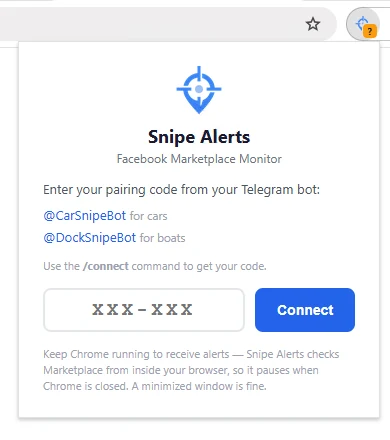
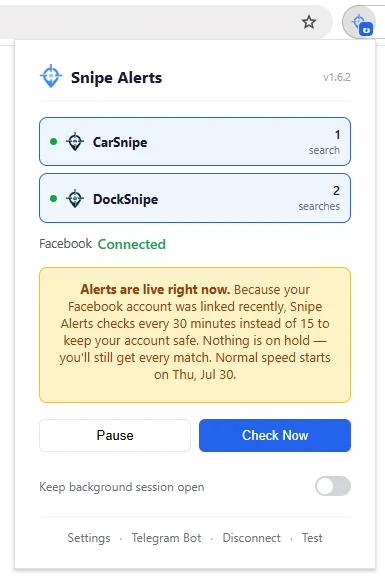
Install the extension
Add it to Chrome, Edge, Brave or Firefox from the buttons above. Nothing else gets installed on your computer.
Pair it with Telegram
Send /connect to @DockSnipeBot. It replies with a one-time pairing code; type that into the extension popup and the two are linked.
Save your first hunt
Segment, length, budget and how far you will drive. Nothing arrives until a hunt is saved, and then boats worth chasing land in the chat.
Once the alerts start arriving the question changes from finding boats to judging them. Our guide to what to check once an alert lands runs the inspection in cost order, so the expensive findings come up before you have talked yourself into the boat. The other half is reading the ad rather than the boat: what to watch for in a Marketplace listing covers the shapes that keep coming back, starting with the price that sits too far under and the photo set that has been used before. Ask for a photo of the transom plate in the same message, then put the characters through our free HIN decoder to read the hull's real model year and certification date before you agree to a viewing.
Before you buy
Know what you are looking at.
Once the alerts start arriving, these are the three that decide what you do with the first one.
- what to check before you buy a used boat In cost order, so the findings that end a viewing come up before the ones you can negotiate.
- what "ran when parked" actually costs to fix The phrases a listing uses about the engine, and the repair bill sitting behind each one.
- what "no title" means, and when it is only a discount Three different situations wearing one phrase. One is fine, one is a delay, one is not the seller's boat.
Questions
Straight answers.
Does my computer have to stay on?
Yes. DockSnipe runs in Chrome or Firefox on your Windows or Mac computer, so checks only happen while it is on and awake. A minimized browser is fine, but closing the browser pauses checking. The alerts come to your phone wherever you are.
How often does it check?
Pro checks each hunt every 3 minutes and Basic every 15, a third as often from 1 to 6 am. All of your hunts share one hourly request limit with Facebook, so with a lot of them each comes around less often. Send /status to @DockSnipeBot to see the pace you are really getting.
Which browsers does it work with?
Chrome, Edge, Brave and Firefox. Any Chromium-based browser that supports extensions will run it.
Why is the store listing not called DockSnipe?
Because it is one extension. DockSnipe and CarSnipe share the same engine, so the listing is published as Snipe Alerts by CarSnipe rather than under either brand on its own. Which bot you pair with is what decides whether you are hunting boats or cars, and you can run both at once.
Do I hand over my Facebook password?
No. It runs on the session you are already logged into and reads only what is public on a listing. It never sees your messages, your friends or your login.
Can I run boats and cars at once?
Yes. One extension, two chats. @DockSnipeBot carries the boats, @CarSnipeBot carries the cars, and each has its own mute and quiet hours so one never buries the other.